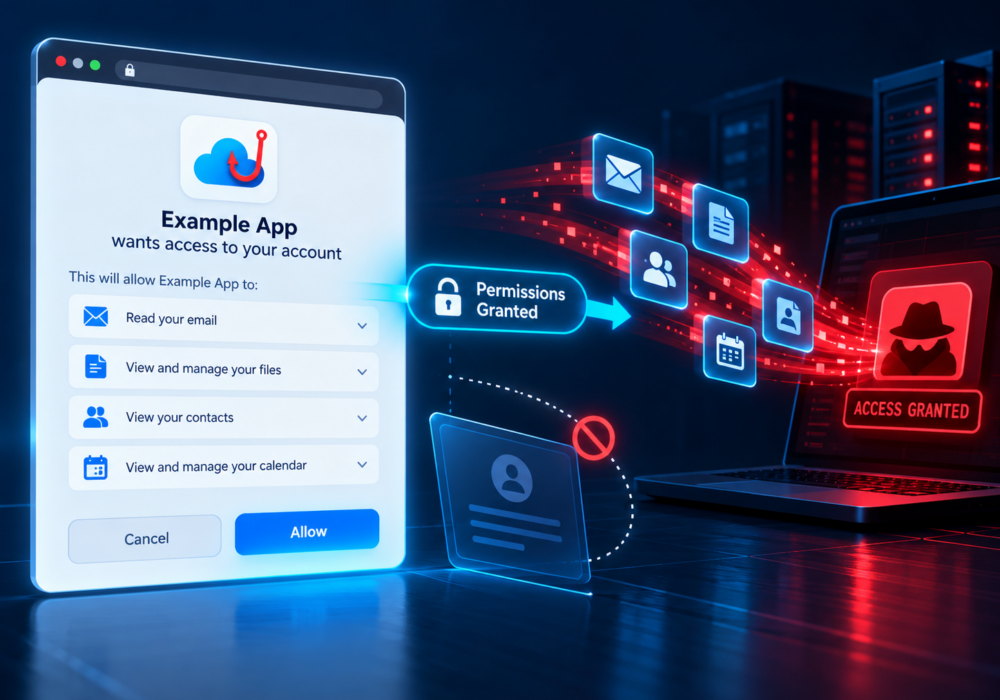
OAuth consent phishing is a phishing technique in which an attacker tries to convince a user to grant a malicious application permission to access their account or data.
Unlike traditional phishing, the attacker may never ask for the victim’s password.
Instead, the victim may be directed to a legitimate Microsoft, Google, or other authorization page. The page displays permissions requested by an application and asks the user to approve them.
The malicious application may have a trustworthy-sounding name or branding designed to make it appear legitimate.
If the user selects Accept or Allow, the application may receive an OAuth token that provides access to whatever information or capabilities were approved.
Depending on the permissions granted, this could include email, files, contacts, profile information, or other cloud resources.
Employees have learned to be suspicious of webpages asking for passwords. OAuth consent phishing requires them to develop another habit:
Be careful about what applications you authorize.
Users should review:
Businesses should also review what third-party applications are connected to company accounts and restrict user consent where appropriate.
MSPs can help clients configure application-consent policies and monitor for suspicious OAuth applications.
When responding to a compromised cloud account, MSPs should look beyond password resets and review:
A malicious application may retain access even after a user changes a password, depending on the environment and authorization granted.
Modern phishing does not always ask for your password.
Sometimes the attacker simply asks you to click Allow.
Users should treat application-permission screens with the same caution they use for login pages.
Additional Reading:
CyberHoot does have some other resources available for your use. Below are links to all of our resources, feel free to check them out whenever you like:
Discover and share the latest cybersecurity trends, tips and best practices – alongside new threats to watch out for.

Author: Katie Boquetti | Editorial: Craig Taylor Editorial by Craig Taylor: Even before Claude Code made...
Read more
Author: Katie Boquetti | Editorial: Craig Taylor Editorial by Craig Taylor: We've known for a while here...
Read more
Author: Katie Boquetti | Editorial: Craig Taylor Editorial by Craig Taylor: A CAPTCHA should test whether...
Read moreGet sharper eyes on human risks, with the positive approach that beats traditional phish testing.