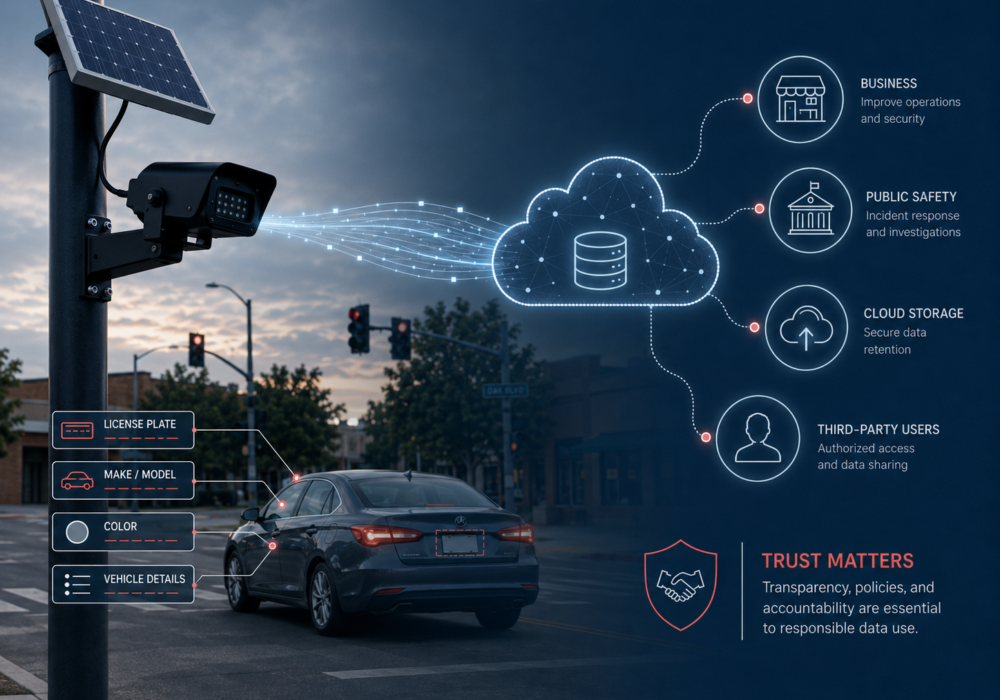
You have seen them before. A small black camera on a pole near an intersection, a solar panel on top, quietly blending into the background. These are Flock Safety cameras, and more than 100,000 of these license plate readers sit active across the United States right now, logging vehicle details around the clock. CyberHoot analyzed a ZDNet article detailing this explosion in Flock Safety cameras.
This story reaches well past traffic cameras. It teaches a lesson every business owner benefits from. Connected devices collect more data than most people expect, and the way a company stores, shares, and secures that data decides who stays protected and who ends up potentially exposed.
Flock cameras go by the name license plate readers, cameras built to photograph and record vehicle plates as cars pass. They log far more than a plate number. Each vehicle gets tagged with make, model, color, and small details like a cracked bumper or a parking sticker. Officers search this information in plain language, typing something like “blue sedan, cracked bumper,” or they add specific plates to an alert list, flagging a match anywhere in the network.
Recent reporting adds another layer. Independent researchers reviewing Flock’s newer Condor cameras, which are pan-tilt-zoom models built to track people rather than vehicles, found search terms aimed at locating individuals and footage of a camera automatically following a pedestrian. This matters for every business owner who assumes a “we only track cars” policy means what it says. Data collection habits expand quietly over time, in your business too, not because anyone plans an invasion of privacy, but because a nice-to-have feature switches on easily and gets forgotten.
Small step for your business:
Researchers found dozens of Flock cameras streaming live video to the open internet with no password and no encryption. Anyone who found the link watched live footage or downloaded up to thirty days of archived recordings, and some feeds even exposed the admin controls. Once inside an exposed device, an attacker gains a foothold for far more than watching. Access like this lets someone pull footage, plant malware, or use the device to reach other traffic across a network.
This mirrors a lesson we teach in every CyberHoot course. A single weak setting decides how safe the whole device stays. A default password, an open port (a network doorway left available for connections), or a skipped firmware update leaves a helpful tool open to anyone looking. Whether the device costs two hundred dollars or sits on your company network, the fix stays the same: change default credentials, keep software current, and confirm who holds remote access.
Small step for your business:
Flock contracts often include a feature sharing camera data with agencies nationwide, sometimes without local knowledge. A default-on setting called National Lookup lets agencies across the country search local camera data. Several communities learned outside agencies had searched their systems only after filing public records requests, and one Oregon city found its database had been searched 279 times in the first three weeks of a pilot program.
Small businesses sign vendor agreements every year for software, security tools, and cloud services. Few owners read the data-sharing clauses closely. The Flock story works as a good reminder to ask a simple question before signing anything: where does our data travel once it leaves our building, and who else gets to see it.
Small step for your business:
One community-built map makes it simple to see whether these cameras operate in your area. DeFlock.me hosts a live map built from public reports, letting you search by city or zip code and tap any marker for details like the operating agency. Because volunteers build the map by hand, an empty area does not always mean camera-free, especially in rural spots that fewer people have checked.
Spotting one yourself stays simple too. Look for a small black camera housing on a metal or utility pole, usually near an intersection, town entrance, or school zone, with a solar panel on top.
You do not need a security budget the size of a police department to make real progress. Pick one internet-connected device in your office today. Check its password (update and store in your password manager if need be), confirm its software is current, and document who holds access (remember that password manager?). This single step moves your business from reactive to prepared, and it costs nothing but ten minutes of your day. Making safer choices today is how strong security habits start. Go get em!
What do Flock license plate reader cameras actually collect?
Flock cameras log far more than a plate number. Each vehicle gets tagged with make, model, color, and small details like a cracked bumper or a parking sticker, and officers search that information in plain language. Newer Condor models are pan-tilt-zoom cameras built to track people rather than vehicles.
How do I check whether my business devices are exposed to the internet?
Run an external vulnerability scan across your internet-facing devices twice a year and whenever you provision a new one. This automated check flags known vulnerabilities, missing patches, and weak or default configurations, giving you a clear, affordable list of what to fix before an outsider finds it first.
What should I ask a vendor about how they handle my data?
Add one line to your vendor checklist asking every vendor directly who they share your data with, and get the answer in writing. Save each vendor’s privacy policy for reference and confirm it protects your data, keeps it out of model training, and sets clear rules for storage, deletion, and use.
How do I find out if Flock cameras are near my business?
Use DeFlock.me, a community-built live map that lets you search by city or zip code and tap any marker for details like the operating agency. Because volunteers build the map by hand, an empty area does not always mean camera-free, especially in rural spots.
Why does the Flock camera story matter for privacy rights?
Flock’s network records where cars travel regardless of whether anyone is suspected of a crime, and it stores that history in a database many agencies search with little oversight. Privacy rights rest on people knowing who collects their information, where it goes, and how long it stays. Asking those questions, and supporting clear rules on data sharing and retention, keeps control in the hands of the public rather than whoever holds the feed.
Discover and share the latest cybersecurity trends, tips and best practices – alongside new threats to watch out for.
Author: Katie Boquetti | Editorial: Craig Taylor Editorial by Craig Taylor: Even before Claude Code made...
Read more
Author: Katie Boquetti | Editorial: Craig Taylor Editorial by Craig Taylor: We've known for a while here...
Read more
Author: Katie Boquetti | Editorial: Craig Taylor Editorial by Craig Taylor: A CAPTCHA should test whether...
Read moreGet sharper eyes on human risks, with the positive approach that beats traditional phish testing.