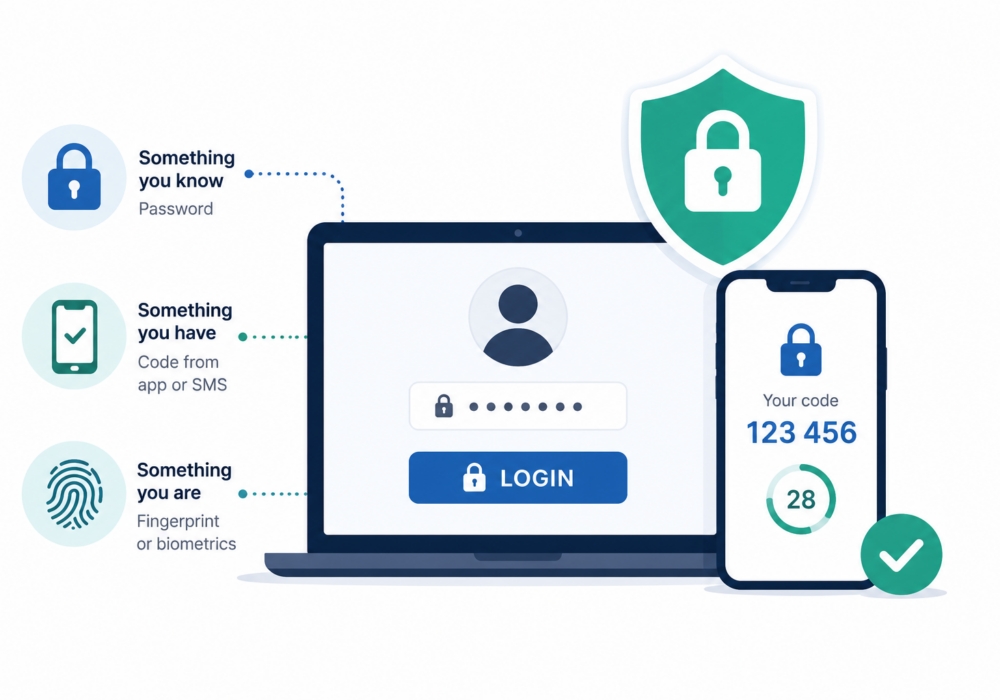
Multi-Factor Authentication (MFA) is a security method that requires users to verify their identity using two or more authentication factors before gaining access to an account or system. Rather than relying on a password alone, MFA combines multiple forms of verification to make unauthorized access much more difficult.
Authentication factors typically fall into three categories:
Even if a cybercriminal steals a password, they usually cannot access the account without the second factor.
Examples of second authentication factors include:
For small and midsize businesses, compromised passwords remain one of the leading causes of cyberattacks, including ransomware and business email compromise (BEC). MFA dramatically reduces this risk by preventing attackers from logging in with stolen credentials alone.
Benefits include:
For many SMBs, enabling MFA is one of the simplest and most effective cybersecurity improvements they can make.
Managed Service Providers (MSPs) are high-value targets because they manage multiple customer environments. A compromised administrator account can impact dozens—or even hundreds—of clients.
MFA helps MSPs by:
Many cyber insurance providers and cybersecurity frameworks now consider MFA a baseline security requirement.
To maximize protection:
While MFA adds an extra layer of security to passwords, passkeys are designed to replace passwords altogether. Organizations should continue using MFA wherever passkeys are unavailable and adopt passkeys as applications begin supporting them.
Multi-Factor Authentication is one of the most effective defenses against account compromise. For SMBs, it dramatically reduces the risk of phishing and ransomware by protecting accounts with an additional verification step. For MSPs, MFA is essential for safeguarding privileged access, protecting customer environments, and meeting modern cybersecurity standards.ged security offerings, and demonstrates ongoing cybersecurity value by identifying threats before they become incidents.
Additional Reading:
CyberHoot does have some other resources available for your use. Below are links to all of our resources, feel free to check them out whenever you like:
Discover and share the latest cybersecurity trends, tips and best practices – alongside new threats to watch out for.
Author: Katie Boquetti | Editorial: Craig Taylor Editorial by Craig Taylor: I'm blessed to have...
Read more
Author: Katie Boquetti | Editorial: Craig Taylor Editorial by Craig Taylor: I remember the early days of...
Read more
Author: Katie Boquetti | Editorial: Craig Taylor Editorial by Craig Taylor: This week's blog has a...
Read moreGet sharper eyes on human risks, with the positive approach that beats traditional phish testing.