This HowTo article explains how to configure Allow Listing rules in to allow Attack Phishing tests to reach end users using BitDefender.
Warning: CyberHoot supports fake email Attack-Phishing for customers. Please keep in mind this approach uses negative reinforcement to reduce click rates in employees. To be successful, always pair with Positive Reinforcement, educational, and realistic HootPhish phishing simulations for the best Affect and Effect on end users.
1.) On the left hand side, scroll down to and click Policies
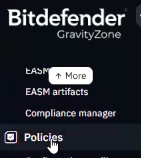
2.) Select the policy you wish to make a change to you, or you can create a new policy and name it “CyberHoot” for example.
3.) Select Network Protection > General
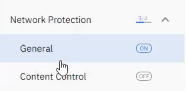
4.) Scroll down until you see Exclusions
5.) To Allow-List Domain Names:
Select Exclusion Type as “URL”, enter the domain name under Excluded Item, and optionally add a Description (for example, “CyberHoot”) to help you quickly identify the purpose of that domain.

6.) To Allow-List IP Addresses:
Select Exclusion Type as “IP/mask”, enter the IP address under Excluded Item, and optionally add a Description (for example, “CyberHoot”) to help you quickly identify the purpose of that domain.
For a list of CyberHoot’s DNS Domain names and IP Address, visit this link: https://cyberhoot.com/howto/cyberhoots-email-ip-addresses-and-hostnames/
Discover and share the latest cybersecurity trends, tips and best practices – alongside new threats to watch out for.
Severity: CRITICAL (CVSS 9.2) | Issued: October 22, 2026 On October 21, two critical flaws in PHP,...
Read more
Author: Katie Boquetti | Editorial: Craig Taylor Editorial by Craig Taylor: Even before Claude Code made...
Read more
Author: Katie Boquetti | Editorial: Craig Taylor Editorial by Craig Taylor: We've known for a while here...
Read moreGet sharper eyes on human risks, with the positive approach that beats traditional phish testing.