Secure Shell (SSH)

7th February 2020 | Cybrary Secure Shell (SSH)


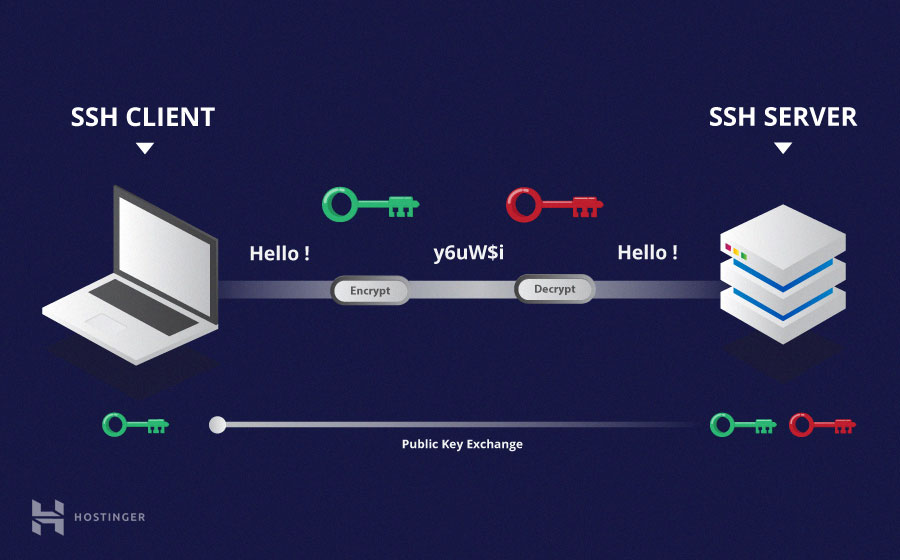
Secure Shell (SSH) is a cryptographic network communications protocol for operating network services securely over an unsecured network. Typical applications include remote command-line, login, and remote command execution, but any network service can be secured with SSH. This service is generally used by Linux and is the linux/unix command line remote access solution that pairs well with 2FA and public/private key access.  It is encrypted and has secure encrypted file sharing capabilities as well with SCP (Secure Copy) and even a windows client known as Putty (also free).

What Should My SMB Do?

If you own a business, you need to be doing these basic things to protect your sensitive information:

  1. Govern employees with policies and procedures. You need a password policy, an acceptable use policy, an information handling policy, and a written information security program (WISP) at a minimum.
  2. Train employees on how to spot and avoid phishing attacks. Adopt a Learning Management system like CyberHoot to teach employees the skills they need to be more confident, productive, and secure.
  3. Test employees with Phishing attacks to practice. CyberHoot’s Phish testing allows businesses to test employees with believable phishing attacks and put those that fail into remedial phish training.
  4. Deploy critical cybersecurity technology including two-factor authentication on all critical accounts. Enable email SPAM filtering, validate backups, deploy DNS protection, antivirus, and anti-malware on all your endpoints.
  5. In the modern Work-from-Home era, make sure you’re managing personal devices connecting to your network by validating their security (patching, antivirus, DNS protections, etc) or prohibiting their use entirely.
  6. If you haven’t had a risk assessment by a 3rd party in the last 2 years, you should have one now. Establishing a risk management framework in your organization is critical to addressing your most egregious risks with your finite time and money.
  7. Buy Cyber-Insurance to protect you in a catastrophic failure situation. Cyber-Insurance is no different than Car, Fire, Flood, or Life insurance. It’s there when you need it most.

Most of these recommendations are built into CyberHoot. With CyberHoot you can govern, train, assess, and test your employees. Visit CyberHoot.com and sign up for our services today. At the very least continue to learn by enrolling in our monthly Cybersecurity newsletters to stay on top of current cybersecurity updates.

Related Terms: Cryptography, Private Key, Public Key

Source:  The Secure Shell (SSH) Protocol Architecture,  RFC 4252

To learn more about Secure Shell (SSH), watch this short video:

Latest Blogs

Stay sharp with the latest security insights

Discover and share the latest cybersecurity trends, tips and best practices – alongside new threats to watch out for.

Hackers steal your cookies. Chrome may help stop Session Cookie Theft!

Hackers steal your cookies. Chrome may help stop Session Cookie Theft!

Google has built and released a new cookie protection measure that makes stolen session cookies useless on any...

Read more
AI Found Your Weaknesses. Let’s Fix Them First.

AI Found Your Weaknesses. Let’s Fix Them First.

New benchmark data names MDASH and Claude Mythos Preview are the top AI agents finding zero-day vulnerabilities...

Read more
Your Identity Is Not Only a Front-Door Problem, It is an Internal Risk Too

Your Identity Is Not Only a Front-Door Problem, It is an Internal Risk Too

One Forgotten Password, Almost a Catastrophe A single Windows machine at a retail store location had a cached...

Read more