


HowTo

Soar through set up with ease.

Quickly access our step-by-step guides and answers to help you make the most of CyberHoot.

HowTo: Complete a HootPhish Assignment

HowTo: Complete a HootPhish Assignment

This brief video (under 2 minutes) gives users a quick overview of their HootPhish assignment. If you're unsure...

Read more
HowTo: Access My Assignments

HowTo: Access My Assignments

The "My Assignments" section helps you stay on top of your training. You can: See which assignments are still...

Read more
HowTo: The Benefits of CyberHoot’s HootPhish

HowTo: The Benefits of CyberHoot’s HootPhish

The Challenges of Traditional Phish Testing Traditional attack-based phishing tests have often felt punitive to...

Read more
CyberHoot’s API Documentation

CyberHoot’s API Documentation

Overview CyberHoot's API allows for the following information to be pulled from the platform: Customers...

Read more
HowTo: Enable Multifactor Authentication within CyberHoot

HowTo: Enable Multifactor Authentication within CyberHoot

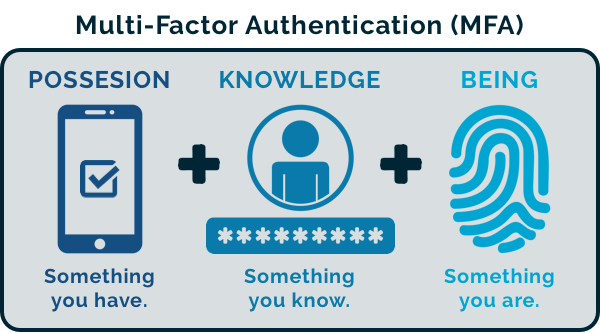
The Importance of Multi-Factor Authentication (MFA) into Cloud/SaaS Applications: CyberHoot recommends clients...

Read more
HowTo: Allow-List CyberHoot’s Domain Name and IP Addresses – Google Workspace

HowTo: Allow-List CyberHoot’s Domain Name and IP Addresses – Google Workspace

New CyberHoot businesses need to allow our training and phishing emails to reach their user's inboxes directly....

Read more
Allow Listing CyberHoot in Sophos EndPoint Protection

Allow Listing CyberHoot in Sophos EndPoint Protection

When Phish testing environments where Sophos EDR is present, you will need to enable allow listing and add the...

Read more
Allow-Listing in ProofPoint (aka: safe-listing, white-listing)

Allow-Listing in ProofPoint (aka: safe-listing, white-listing)

If you're using Proofpoint's spam filtering software, you can safelist (whitelist) CyberHoot to allow your users...

Read more
Autopilot Platform Administration Overview

Autopilot Platform Administration Overview

Welcome to the CyberHoot Autopilot Platform: A Guided Tour for New Administrators Starting with a new platform...

Read more
HowTo: How to Add Users via M365 (Entra ID)

HowTo: How to Add Users via M365 (Entra ID)

Adding users to CyberHoot's Autopilot Platform via M365/ Entra ID Sync. If your company uses M365 / Entra ID, you...

Read more
HowTo: Reauthorize Entra ID – Client Secret

HowTo: Reauthorize Entra ID – Client Secret

The Entra ID sync is not functioning because the provided client secret has expired. To resolve this, you will...

Read more
HowTo: Allow-List by X-Header in Exchange 2013, 2016, or Microsoft 365

HowTo: Allow-List by X-Header in Exchange 2013, 2016, or Microsoft 365

Allow-Listing X-Headers is necessary in order for CyberHoot to send simulated phishing emails to bypass your...

Read more
Testimonials

See who's talking about Cyberhoot

"The ease of setup and use for both administrators and users was immediately apparent. The automated training and phishing awareness features are major time savers for HR and IT teams.”
Natalie Ripple, Redzone Technologies, System Analyst
"While it is well known that there are many cyber security threats, sorting out how to protect yourself without accidentally exposing yourself can be a daunting task. For a small organization like ours, this type expertise and time to research..."
Astrid Wielens, Zebra Crossings, Executive Director
"I reviewed over a dozen learning management platforms, and I have to say, CyberHoot is soaring way above the others."
Nick Marteney, MotherBear Security, Co-Founder & CEO
“Using CyberHoot was one of the best decisions we made regarding SAT. Fully automated, training is interesting, and staff participation is high compared to other vendors.”
Michael Gibby, SEQ IT Services, Founder & Managing Director
"Cybersecurity training is complicated, partnering with CyberHoot keeps it simple. Our users are engaged with little administrative overhead."
Jeremy Treister, CMIT Solutions of Chicago Downtown, President
