Google has built and released a new cookie protection measure that makes stolen session cookies useless on any other device for websites updated to support this approach. Here is what it does, who it helps, and what to do right now.
The Short Version
Infostealer malware does not need your password or even your MFA Codes. All it needs is the small file your browser stores after you log in called a Session Cookie. For years, stealing that file alone was enough to impersonate you online, bypassing usernames, passwords, and even Multi-Factor Authentication (MFA). Chrome now ties that file to your specific device so session cookies stop working anywhere preventing “session theft” attacks.
When you log into a website, your browser receives a session cookie, a small token that proves you already signed in. From that point forward, the server trusts the token, not your password. This made browsing fast and convenient, but it also created a real weakness. Whoever holds the cookie holds your session, no password and no MFA needed.
Infostealer malware families like LummaC2 spent 2024 and 2025 quietly harvesting these tokens and selling them in online markets. Because cookies often stay valid for days or weeks, attackers had plenty of time to use them before anyone noticed.
There is no reliable way to prevent cookie exfiltration using software alone on any operating system.
Google Security Team, April 2026
Google’s answer is called Device Bound Session Credentials, or DBSC. It is now available for everyone on Chrome 146 for Windows, with macOS support coming soon. The idea is simple: instead of trusting a cookie by itself, Chrome ties the session to the physical device where you logged in. Even if a thief steals the cookie, it stops working on any other machine.
Google’s own testing showed DBSC blocked 94% of cookie theft attempts during beta. For the 6% that succeeded, their success required malware that was private key aware embedded on the machine beforehand. Each session also uses a separate key per site, so websites cannot use this system to track you across different visits or link your activity together.
Chrome moved first and most completely. Here is a comparison of where each major desktop browser stands today on this protection. Apple expressed worries of a “Super-Cookie” that enables undeletable tracking across sessions. The W3C specification addresses this by ensuring keys are cleared along with website data. Apple remains in the position of “under discussion” rather than “under development”.
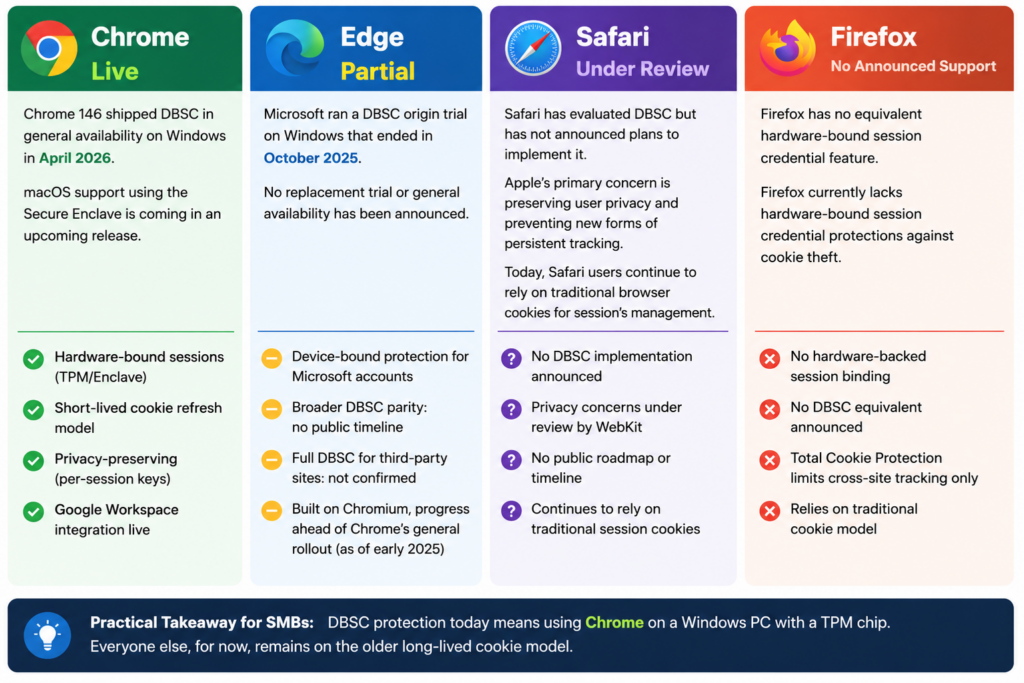
This protection is real and it matters. It is also not the end of the story. Here are four things to keep in mind.
Already stolen cookies
The 51.7 million credential packages already floating around online are not affected. DBSC only protects new sessions created after it is active.
Older hardware
Devices without a TPM or Secure Enclave fall back to the old unprotected behavior. Many older business computers do not have this chip, so check yours.
Run the PowerShell Command: Get-Tpm
Websites need to update too
DBSC requires the website to add support on its end. Google and Okta have done this. Most other apps and platforms are still working on it.
Other browsers are not covered
Anyone using Firefox, Safari, Edge without full DBSC support, or a mobile browser for work access do not get this protection today.
You do not need to be a security expert to benefit from this. Chrome does the heavy lifting automatically on supported hardware. Your job is to make sure it can do its job.
On a personal device, open Chrome and go to Settings, then Help, then About Google Chrome. If you are not on version 146 or later, update now. On Windows 11, your device almost certainly has the TPM chip needed for this to work. If you are on an older machine or Windows 10, check your manufacturer’s specs to confirm.
For business owners and IT leads, add this to your next team check-in: confirm your staff is on Chrome 146 or later, ask your IT person to verify TPM is active on Windows devices, and keep an eye out for announcements from your key business apps about DBSC support. Progress is happening fast.
Your one-line takeaway: update Chrome, check your hardware for a TPM chip, and feel good knowing that very soon, many websites will prevent stolen session cookies from working stopping session cookie theft attacks. The Cookie Monsters will be gone!
Discover and share the latest cybersecurity trends, tips and best practices – alongside new threats to watch out for.

Author: Katie Boquetti | Editorial: Craig Taylor Editorial by Craig Taylor: Even before Claude Code made...
Read more
Author: Katie Boquetti | Editorial: Craig Taylor Editorial by Craig Taylor: We've known for a while here...
Read more
Author: Katie Boquetti | Editorial: Craig Taylor Editorial by Craig Taylor: A CAPTCHA should test whether...
Read moreGet sharper eyes on human risks, with the positive approach that beats traditional phish testing.