Author: Katie Boquetti | Editorial: Craig Taylor
A CAPTCHA should test whether you’re human. It should not audition you for the IT department.
If “prove you’re human” means opening PowerShell, the only command you need is: close the tab.
Criminals call their instructions a fix. Security researchers call the trick ClickFix. A fake CAPTCHA or error message gets you to run a command that delivers malware.
Already know this trick? Help protect the next person who doesn’t. Tell your IT team, then use the right reporting channel:
Also flag the fake GPT, deceptive ad, and hosted page through their platforms’ abuse-reporting tools.
Report the exact suspicious page or payload URL. Do not report an entire legitimate hosting domain.
Use evidence you already have. Do not run the command, revisit the site, or download malware to investigate. Already ran it? Disconnect from the network and contact IT first.
Cybersecurity is a team sport. A quick heads-up can help defenders protect the next busy person trying to finish work.
For everyone meeting ClickFix for the first time, remember: never run a command to prove you’re human. Picking out bicycles is annoying. Giving criminals your computer is far worse.
— Craig
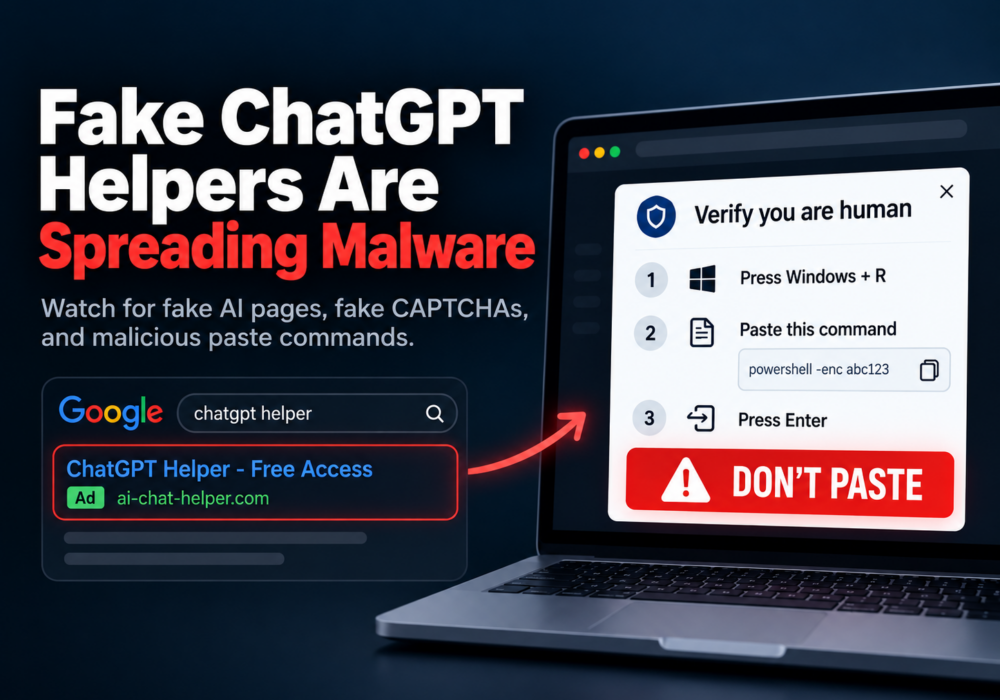
In late September 2026, Huntress investigated sponsored Google results for searches such as “chatgpt.” They led to attacker-created Custom GPTs named “Plus 5.6” on chatgpt.com.
A fake service notice directed visitors to a “backup” Google Sites page. Its fake Cloudflare CAPTCHA instructed them to paste and run a PowerShell command. That command started a remote access trojan infection.
Huntress reported at least 40 related incidents involving that Google Sites domain. Two were confirmed to have entered through a Custom GPT.
A remote access trojan, or RAT, gives attackers control of an infected computer. This RAT could access cameras and microphones, search files, and install additional malware.
You do not need to memorize its internals. Recognizing an unexpected request to run commands is the useful employee skill.
What follows are five key lessons for readers, they’re meant to keep you safe online.
Custom GPTs are personalized versions of ChatGPT. They can include instructions, reference files, and tools without requiring the creator to write code.
User-created GPTs and Google Sites pages can live on familiar domains. A trusted host does not establish the creator’s identity or intentions.
Your move: examine what the page asks you to do. Be cautious when a supposed helper requests credentials, downloads, or commands.
A result labeled “Sponsored” is a paid advertisement. Criminals buy ads too.
Your move: type chatgpt.com yourself, use a trusted bookmark, or open the official app. Do the same for banking, payroll, and everyday business tools.
A bookmark helps you reach the intended service. You still need to evaluate user-created content once you arrive.
A human-verification check should never require executing commands in Windows Run, PowerShell, or Terminal.
Your move: close the tab and report the request. Do not follow instructions to press Windows + R, paste a command, and run it.
Legitimate technical documentation sometimes provides commands. Unexpected troubleshooting instructions still need verification through your established IT support channel.
Never run a command to prove you’re human.
An overloaded service and an immediate shortcut can make a risky instruction sound helpful. Pause when that shortcut sends you somewhere unfamiliar. Pause when it urges immediate action, confirms its authority to compel action, or seeks quiet implementation over following process “for expediency”.
Your move: reopen the official service yourself. Verify the problem through its official support channel, your IT team, or a trust number you call.
Mistakes happen to smart, careful people. Reporting quickly gives responders a better chance to limit damage.
Your move: disconnect from Wi-Fi and unplug any network cable. Use another device to contact IT or your managed service provider immediately.
Share the website, the approximate time, and what you pasted or ran. Do not rerun the command or attempt another website-provided fix.
Follow IT’s instructions on recovery and any needed password changes or session revocation. Keep the device disconnected until responders clear it.
Leaders: thank the person who reports it and give yourself bonus points if you recognize them publicly. Make asking for help easy. Fear of embarrassment should never delay a useful warning.
These habits work best alongside technical protection. Awareness gives people a useful pause. Technical controls provide additional chances to prevent or detect an attack.
Fake ChatGPT helpers are spreading malware. You can help your team recognize the trap without becoming a malware analyst.
Teach one habit this week: never run a command to prove you’re human. Celebrate the people who pause and report.
CyberHoot’s short, upbeat lessons and positive reinforcement phishing simulations help teams practice safer decisions. Start with one lesson and share it with one coworker.
Laugh, learn, and Hoot Up!
ClickFix is a social engineering technique that uses fake errors or verification requests to trick people into running malicious commands. Never run a command to prove you’re human. Verify unexpected troubleshooting instructions with your IT team.
A Custom GPT is a personalized version of ChatGPT with instructions, reference files, or tools. It can be created without coding. User-created GPTs can appear on chatgpt.com; being hosted there does not mean OpenAI authored or endorsed their instructions.
Type chatgpt.com yourself, use a trusted bookmark, or open the official app. Avoid using sponsored results as your shortcut. Reaching the official website does not make every user-created GPT trustworthy.
If you ran it, or are unsure whether it ran, disconnect the device from the network. Contact IT or your managed service provider immediately from another device. Share where the command came from and when this happened. Do not rerun it or reconnect until IT clears the device.
Viewing a page or copying text does not prove that malware ran. Close the page and report it. Tell IT if you also pasted into Run or a terminal, downloaded or opened a file, or entered credentials. If you are unsure, ask for help.
Tell IT first. Google Safe Browsing has separate phishing and malware forms. Microsoft SmartScreen accepts unsafe-site reports. Experienced defenders can submit active, direct malware-distribution URLs to URLhaus. Report U.S. cybercrime to FBI IC3. Use the links at the beginning of this article.
Start with clear guidance, trusted bookmarks, positive training, and easy reporting. Keep browser and endpoint protections enabled. Ask IT which application controls and monitoring fit your business. Costs vary; awareness and technical controls should work together.
URLhaus submission policy; Google Safe Browsing reporting guidance; Microsoft unsafe-site reporting guidance; FBI Internet Crime Complaint Center.
Huntress: Attackers Abuse ChatGPT Custom GPTs to Deliver RAT via ClickFix — primary campaign investigation.
The Hacker News: Attackers Abuse ChatGPT Custom GPTs to Deliver RAT via ClickFix Lures — September 30, 2026 coverage.
Microsoft: Think before you Click(Fix) — technique and technical defenses.
Discover and share the latest cybersecurity trends, tips and best practices – alongside new threats to watch out for.

Most phishing tests lie to your employees. This one says hello first! HootPhish tells people up front: this is...
Read more
Severity: CRITICAL (CVSS 9.2) | Issued: October 22, 2026 On October 21, two critical flaws in PHP,...
Read more
Author: Katie Boquetti | Editorial: Craig Taylor Editorial by Craig Taylor: Even before Claude Code made...
Read moreGet sharper eyes on human risks, with the positive approach that beats traditional phish testing.