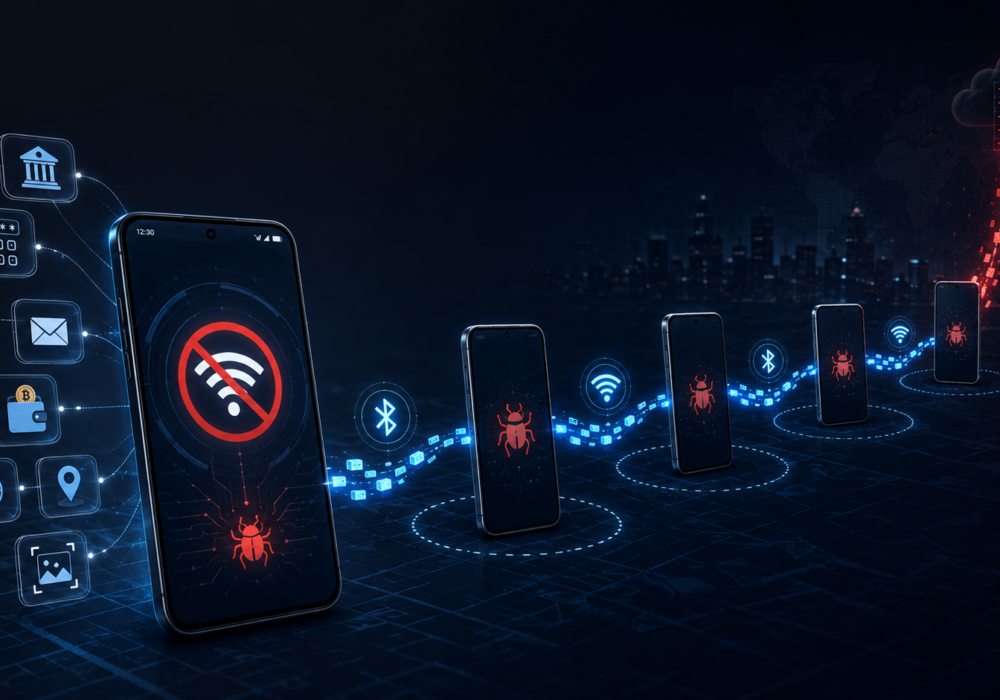
Every so often a piece of malware comes along with a trick clever enough to make security researchers pause and take note. Manic is one of those. It’s a new Android threat, and it does something most malware never bothers with. When an infected phone loses internet access, Manic finds a way to keep stealing anyway.
It’s criminal behaviors include keylogging, screen manipulations, man-in-the-middle replay attacks, and hidden spyware all rolled up into one malicious package. To experienced cybersecurity professionals, it’s clear Hackers have leveraged the power of AI development in this latest piece of malware.
Researchers at ThreatFabric found Manic targeting banks, government ID services, messaging apps, cryptocurrency platforms, and even military communication tools, mostly in Ukraine, Russia, and parts of Europe. It watches for 169 specific apps on an infected phone, including banking apps, payment services, crypto wallets, browsers, and email clients.
Once it’s running, Manic works like a combination of a banking trojan and spyware. It logs what you type, grabs one-time codes, tracks your location, and takes screenshots. It even uses a clever overlay trick to steal your PIN. When you tap your banking app’s keypad, Manic quietly records where you tapped, then replays the same tap on the real screen underneath. Your banking app works exactly as expected, so you never notice anything happened.
Most malware needs an internet connection to send stolen data back to the attacker. Turn off Wi-Fi and mobile data, and the malware usually goes quiet.
Manic found a workaround. If an infected phone has no connection, it looks for other nearby infected phones using Bluetooth or Wi-Fi Direct. If it finds one, it hands off the stolen data to the second phone, and the data hops along until it reaches the attacker. Data hops across up to four devices this way.
This is a good reminder: airplane mode isn’t a magic shield. The real protection comes from keeping malware off your phone in the first place.
Manic spreads through phishing sites and fake apps disguised as everyday utilities. It does not come from the official Google Play Store. This is one of the most encouraging parts of the story. The people behind Manic rely on tricking someone into installing something outside of trusted channels. This means you hold more control here than you might think.
You do not need enterprise security software or a dedicated IT department to lower your risk. Try these habits, starting today.
Cyber threats sound scary in headlines, but your everyday habits matter more than any single piece of news. Every time you check an app source before installing, or pause before tapping a suspicious link, you’re building a stronger version of your digital self than you had yesterday. This is the whole game. Small, steady choices beat perfection every time.
Take five minutes this week and check which apps on your phone came from outside the Play Store. Delete anything you don’t recognize or don’t need. This is a real win, and it counts.
What is Manic malware? Manic is Android malware combining banking trojan tricks with spyware features like location tracking and screen recording.
How does Manic get onto phones? It spreads through phishing links and fake apps posing as regular utilities, not through Android’s official Play Store.
Does turning off my phone’s internet stop Manic from stealing data? Not always. Manic looks for other nearby infected phones over Bluetooth or Wi-Fi Direct and uses them to relay stolen data to the attacker.
Which apps does Manic target? It watches 169 apps, including banks, payment services, crypto wallets, browsers, email clients, and messaging apps.
What’s the single best step to take right away? Only install apps from the Google Play Store and keep Google Play Protect turned on. Those two habits block most of the ways malware like this gets started.
Discover and share the latest cybersecurity trends, tips and best practices – alongside new threats to watch out for.

Most phishing tests lie to your employees. This one says hello first! HootPhish tells people up front: this is...
Read more
Severity: CRITICAL (CVSS 9.2) | Issued: October 22, 2026 On October 21, two critical flaws in PHP,...
Read more
Author: Katie Boquetti | Editorial: Craig Taylor Editorial by Craig Taylor: Even before Claude Code made...
Read moreGet sharper eyes on human risks, with the positive approach that beats traditional phish testing.