Author: Katie Boquetti | Editorial: Craig Taylor
I remember the early days of search. Dogpile, Ask Jeeves, AltaVista, and then Google arrived and changed everything. For years a search simply worked. You typed a question and trusted the answer near the top.
Lately that trust has worn thin. Google now stacks three, four, even five vendor ads above the real results, and I catch myself skipping the whole mess and asking my favorite AI instead. Call it nostalgia, but I miss the days when the top of Google’s search page was a spot you could trust.
The article below is a reminder that clutter is not the worst thing waiting at the top of a Google search. Criminals now build fake vendor pages, copied down to the logo and the download button, to slip malware onto your computers. The fix for this comes in two parts, one old fashioned and one technical. The old fashioned part is simple. Stop trusting the search result, get your software straight from the official vendor page, and thank the person on your team who pauses to ask before installing. The technical part protects you when a habit slips. Take everyday admin rights off your people’s accounts. A standard user account blocks most of this malware, since the attack needs admin rights to switch off your defenses and disable your updates. Good habits keep the risky click rare, and least privilege makes sure one slip does not give away the whole machine.
Share this one with the people who still type a brand name into the search bar and click the first result. They will thank you for it.
And remember: Laugh. Learn. and Hoot Up!
Craig
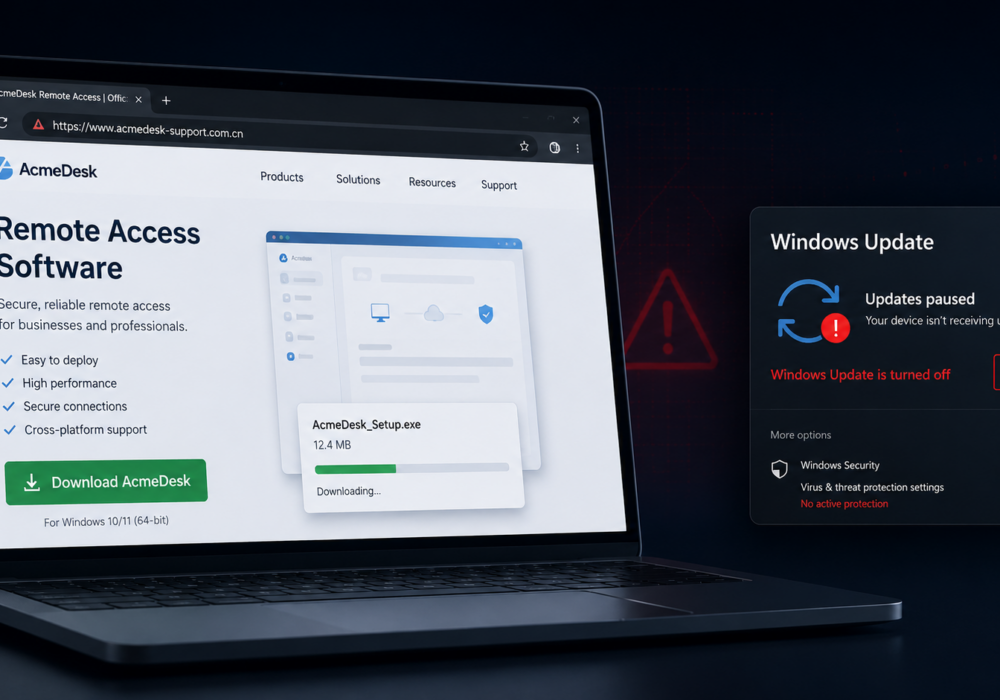
Microsoft published research on an active malware campaign with a simple setup. Someone searches for popular software, clicks a result near the top of the page, lands on a page looking exactly like the real vendor site, and downloads an installer. The file runs. Nothing looks wrong on screen. Underneath, the installer switches off Windows Update, adds Microsoft Defender exclusions, and opens a connection back to the attacker. All bad outcomes.
There is plenty of good news here. Most security tools will catch these installers before they run. If one slips through, a standard user without admin rights blocks most of what the installer tries to do. And when your team knows where to get legitimate software, this threat never reaches your desktops at all.
The attackers registered domains close to real brand names using country code endings like .com.cn and .hl.cn. They copied vendor pages down to the layout, the logo, and the big green download button. Impersonated brands included web browsers, PDF editors, ebook readers, mind mapping apps, screen recorders, disk utilities, translation tools, and gaming hardware.
One detail makes blocking harder than usual. The downloaded ZIP file keeps the same name every time, while its contents change with every request. Each visitor receives a slightly different file, so security tools looking for a known bad file fingerprint have nothing to match. Detection has to focus on behavior after installation instead.
Confirmed victims work in healthcare, manufacturing, gaming, technology, logistics, government, and education. Microsoft links the activity with moderate confidence to a group tracked as Silver Fox, known for fake vendor download pages going back several years.
The installer makes a series of quiet changes to the computer.
Microsoft Defender detected the activity and started automatic containment, so the end goal of the campaign stays unknown.
Switching off Windows Update does the most long term damage on this list. A computer with updates disabled keeps working, keeps opening email, and keeps looking healthy to the person using it. Every new security patch skips the machine. Weeks later, the same computer sits exposed to flaws already fixed on every other desktop in your office.
Treat patch reporting as a security signal, not as an IT housekeeping chore. A machine going quiet in your update reports has earned a closer look.
Each step below gives you three levels. Good gets you moving today at little or no cost. Better adds stronger protection with modest effort. Best gives you the most protection of all, and it takes more time and money to stand up and keep running.
Start at Good on every line this week. You will end the day safer than you started, and you build toward Better and Best on your own timeline.
If a machine shows these signs, rebuilding beats cleaning. The malware removes shadow copies, locks its own folders, and breaks updating, so a partial cleanup leaves problems behind. Reimage the device, change the passwords used on it, and move on with confidence.
Pick a Good action from each step above and put it in place today. Tell your team about this attack, and walk them through the protections you are adding on their behalf. Ask everyone to learn the one reliable tell, the web address, and to check with you before installing anything new. The Good steps take minutes, not afternoons, and each one leaves your organization safer tonight than it was this morning. Build the habit, reward people for asking before installing, and keep hooting.
How do I spot a fake download site before clicking?
Look at the web address rather than the page design, because the design is a near perfect copy. Odd country code endings, hyphenated brand names, and unfamiliar subdomains are common signs. The stronger fix is to stop relying on eyeballs. Get software from a managed source like a self service catalog or the official vendor page, so a fake result never enters the picture.
Why does a changing file fingerprint matter?
Many security tools identify bad files by a unique hash value. When a server builds a fresh copy of the malware for every download, each victim gets a one of a kind file, so hash based blocking never gains traction. Behavior based detection carries the load instead.
How risky is a disabled Windows Update service?
One compromise turns into open ended exposure. The computer looks and feels normal while missing every patch released from then on. Machines in this state give attackers a reliable way back in months later.
Does Microsoft Defender protect me here?
Partly. Defender detected this campaign and contained it in the cases Microsoft studied. The malware still tries to add its own exclusion folders using SYSTEM rights, so protection depends on tamper protection being enabled, exclusion changes being reviewed, and staff working without unnecessary administrator rights.
Is this only a concern for companies operating in China?
Reported impact centers on China based operations and Chinese speaking users, since the fake pages use Chinese language content. The technique travels well. Fake installer campaigns targeting English language brands appear regularly, and the after install behavior works the same on any Windows computer.
What about employees installing software at home on a work laptop?
Same advice, warmer delivery. People install personal tools on work devices because they are trying to get something done. Give them a self service catalog to install approved tools with one click, a simple way to request additions, and a standard account without admin rights. The risky search engine detour disappears, and one stray click does far less damage.
Discover and share the latest cybersecurity trends, tips and best practices – alongside new threats to watch out for.
Author: Katie Boquetti | Editorial: Craig Taylor Editorial by Craig Taylor: I remember the early days of...
Read more
Author: Katie Boquetti | Editorial: Craig Taylor Editorial by Craig Taylor: This week's blog has a...
Read more
Every so often a piece of malware comes along with a trick clever enough to make security researchers pause and...
Read moreGet sharper eyes on human risks, with the positive approach that beats traditional phish testing.

