This HowTo article explains how to configure Allow Listing rules in to allow Attack Phishing tests to reach end users using MailProtector.
Warning: CyberHoot supports fake email Attack-Phishing for customers. Please keep in mind this approach uses negative reinforcement to reduce click rates in employees. To be successful, always pair with Positive Reinforcement, educational, and realistic HootPhish phishing simulations for the best Affect and Effect on end users.
1.) Access the MailProtector site at https://emailservice.io/signin
2.) Select the Domains tab

3.) Select the domain you wish to configure allow-listing rules.
4.) Select the Filtering tab

5.) You will see Allow rules (inbound only), from there, you can input CyberHoot’s DNS Domain names easily on the right hand side under “Always allow emails from” input box. Then click “Add” to add the domains.
For a full list of our DNS Domain names, follow this link: https://cyberhoot.com/howto/cyberhoots-email-ip-addresses-and-hostnames/
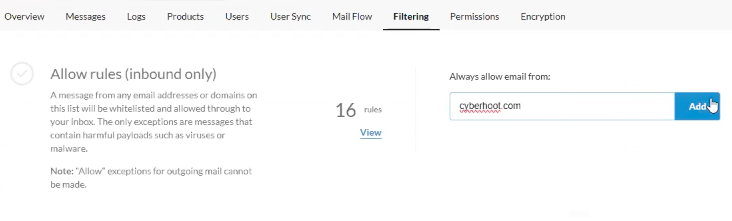
MailProtector only needs the DNS Domain names to allow-list as they don’t accept IP Addresses to allow-list. But once you have set up all of CyberHoot’s DNS Domain names then you are good to go!
Discover and share the latest cybersecurity trends, tips and best practices – alongside new threats to watch out for.
Active Attacks on Messaging Apps The Cybersecurity and Infrastructure Security Agency (CISA) recently issued...
Read more
The world of work has changed enormously since COVID-19. Gone are the days when IT admins sat behind a corporate...
Read more
Let’s be honest, who hasn’t reset a password at least once this month? For decades, passwords have been our...
Read moreGet sharper eyes on human risks, with the positive approach that beats traditional phish testing.