Author: Katie Boquetti | Editorial: Craig Taylor
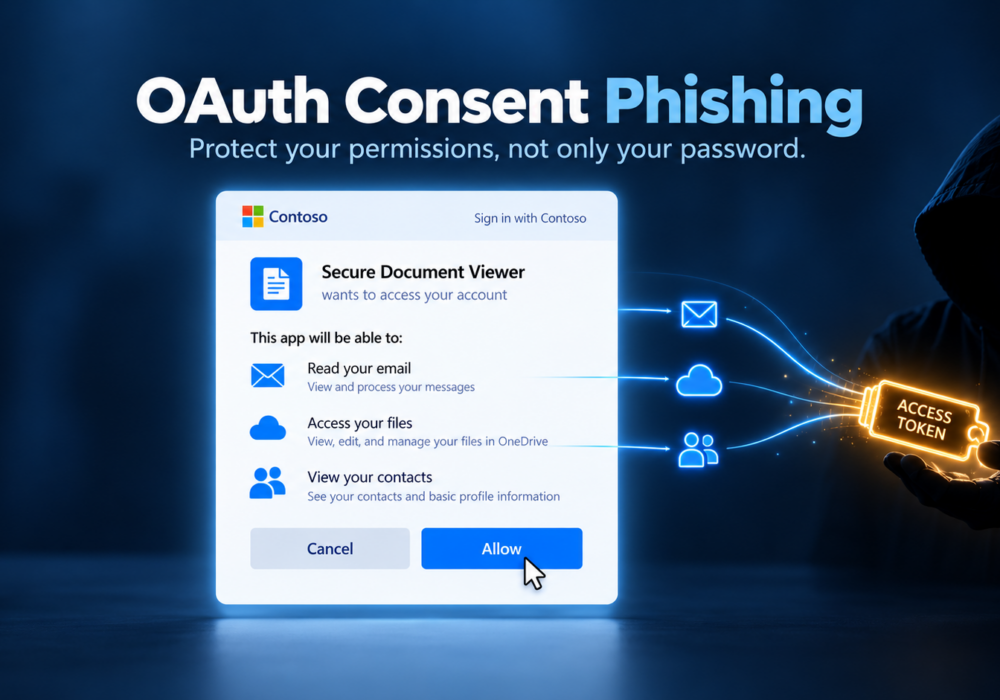
I’m blessed to have relationships with hundreds of Managed Service Providers and thousands of security professionals. Most of these folks know my passion for security and they feed me timely bits of “Threat Intelligence“. Last week a dear friend of mine, Armando, sent me an article on “OAuth Consent Phishing“. If I’m being honest, at first, I was like – wait… what? When I looked into this more, I confirmed indeed it is a growing hacker attack. In fact, it’s become such a problem that the FBI released this Public Service Announcement on Sept. 1st 2026. Hackers use socially engineer and phishing emails to convince us into granting ‘fake app’ access permissions to our email account or our Microsoft/Google directories. With enough permissions granted via OAuth, the hacker might send email from our account, or steal privileged data that often lives inside our inboxes.
So I thanked Armando for the topic and agreed CyberHoot would cover this topic in our next Blog article to create awareness around it. Once you know what you’re up against, you’re much better prepared to not fall victim to this spin on social engineering and phishing. But does all of your team, or all your employees, or your family members know about this attack method? It’s more insidious than we want it to be. Create some awareness and share this article with anyone who needs to know!
— Craig
You have spent years learning to protect your password. You check links before you click, you watch for fake login pages, and you turned on multifactor authentication (MFA). Those habits stop a large share of attacks, so give yourself credit. OAuth consent phishing takes a different route. The attacker never asks for your password. They ask for your permission instead, and the request appears on a genuine Microsoft or Google login screen.
OAuth is the system behind the “Allow this app to access your account” screens you see all the time. When a scheduling tool wants to read your calendar, or an electronic signature app wants to open a file in OneDrive, OAuth handles the request. You sign in, review a list of permissions, and click Accept. The app then receives a digital pass, called a token, which lets it act on your behalf within those apps. This is a useful everyday feature, and most apps using it are legitimate.
An attacker registers their own app, gives it a trustworthy name such as “Secure Document Viewer” or “Office Update Helper,” and adds a clean logo. Next, they send you a link through email, Teams, or Slack, often with a nudge like “Your shared file expires in one hour.” The link opens the real Microsoft or Google sign in page. After you sign in, a consent screen asks for access to your mail, your files, or your contacts. Once you click Accept, the attacker’s app receives a token, and the attacker uses it to read your inbox, search your documents, and send email as you without ever needing your password.
MFA confirms you are the person signing in. In a consent phishing attack, you are the person signing in, so MFA works exactly as designed. The trouble starts after login, when you grant the app access. Because the attacker holds a token instead of your password, changing your password leaves their access in place until someone revokes the app’s permissions. Keep MFA turned on, since it blocks many other attacks, and add the simple protections below to cover this one.
A consent screen tells you a lot if you give it five seconds. Check the publisher name first. Microsoft marks apps from confirmed companies with a verified badge, and an unverified publisher on a request you didn’t expect deserves a pause. Next, compare the permissions with the app’s purpose. A PDF viewer has no reason to read your entire mailbox or send messages as you, and your PDF viewer has no friends to email anyway. Watch for requests to “maintain access to data you have given it access to,” which lets the app keep working while you are offline. When the message around the link pushes you to hurry, treat the urgency as your signal to slow down.
If you use Microsoft 365, an administrator opens the Microsoft Entra admin center and sets user consent so employees approve only apps from verified publishers requesting low risk permissions. Turn on the admin consent workflow at the same time, so employees request an app and a reviewer approves it instead of leaving people stuck.
Google Workspace offers similar settings under API controls, where an admin decides which third party apps connect to company accounts. These settings live in the standard admin consoles, with no extra tools to buy.
Set a quarterly calendar reminder to review the apps connected to your company accounts. Look for apps with broad permissions, apps only one person uses, or names nobody on the team recognizes, and remove anything unfamiliar. Add a sample consent screen to your next team training so people see what a real login paired with a bad request looks like. When someone reports a suspicious prompt, thank them, even if the app turns out to be fine. Every report is a good decision worth celebrating.
Clicking Accept on a sneaky app happens to careful people, and fixing it quickly counts as a win. Visit myapps.microsoft.com or the Security section of your Google Account, find the app, and remove its access. Then tell your IT contact or managed service provider. They will revoke the app’s permissions across the organization, sign you out of active sessions, and check the logs to see what the app touched. A password reset alone leaves the app connected, so make revoking access your first move.
Pick one small step this week. Open myapps.microsoft.com or your Google Account, look at the apps connected to your work account, and remove one you no longer use. If you manage a team, spend ten minutes checking your user consent settings, then share this article with your coworkers so they know what a sketchy permission request looks like. Every app you review makes your organization safer than it was yesterday. Protect your credentials, protect your permissions, and keep going. Laugh, Learn, and Hoot Up!
What is OAuth consent phishing?
OAuth consent phishing is an attack where a criminal tricks you into granting their app permission to your Microsoft or Google account. The attacker skips your password entirely and uses the access you approve to read email, open files, or send messages as you.
Does MFA protect me from consent phishing?
MFA confirms your identity at sign in, and in this attack you are the one signing in. MFA stays important for blocking other attacks, while consent settings and a quick review of each permission screen protect you from this one.
Will changing my password remove the attacker’s access?
A password reset leaves the attacker’s access in place, because the app uses a token instead of your password. Remove the app from your account, or ask your administrator to revoke its permissions.
How do I check which apps have access to my account?
For a Microsoft work account, visit myapps.microsoft.com. For Google, open your Google Account, select Security, and review the third party apps connected to your account. Remove any app you don’t recognize or no longer use.
Is an app from a verified publisher always safe?
Verification confirms a real company stands behind the app, which lowers the risk. Still compare the permissions with what the app does, and ask your IT contact about any verified app requesting far more access than it needs.
What should a small business do first?
Turn on the restricted user consent setting in Microsoft Entra, or the matching API controls in Google Workspace. This single change stops employees from approving unverified apps on their own, and it costs nothing extra.
Microsoft Entra Blog: OAuth Consent Phishing Explained and Prevented
FBI IC3 PSA: Malicious Cyber Actors Gain Access to Victim Accounts Through Consent Phishing (September 1st 2026)
The Hacker News: The New Phishing Click: How OAuth Consent Bypasses MFA (May 2026)
Discover and share the latest cybersecurity trends, tips and best practices – alongside new threats to watch out for.
Most phishing tests lie to your employees. This one says hello first! HootPhish tells people up front: this is...
Read more
Severity: CRITICAL (CVSS 9.2) | Issued: October 22, 2026 On October 21, two critical flaws in PHP,...
Read more
Author: Katie Boquetti | Editorial: Craig Taylor Editorial by Craig Taylor: Even before Claude Code made...
Read moreGet sharper eyes on human risks, with the positive approach that beats traditional phish testing.